

Pop-Up Golf Instructions
In addition to league and event play, our chapter offers Pop-Up Golf where registered members can easily find other Pop-Up Golfers which whom to play a round of golf through the Golf Genius tool. When you register for Pop-Up Golf you check if you are available for weekdays, weeknights, and/or weekend play. If you have a handicap, it is helpful to your fellow Pop-Up Golfers to enter your handicap and/or your GHIN number (this is an 8-digit number).
To engage with other Pop-Up Golfers
Secure a tee time and go to the Pop-Up Golf portal page https://lpgaams-2025coastalnjpopupgolf.golfgenius.com where you can find players who may be available for your tee time.
 Let’s say you have a 10:35am Tuesday tee time at Pebble Creek and want to find 3 other players to join you. At the Pop-Up portal page, click on Player Info (circled in red on the picture on the right). This will bring up a list of all Pop-Up Golf players.
If you wish to send out a blanket invitation to all Pop-Up Golfers, look at the graphic below for the circled “Check all” and “Email” control buttons. First, select the “Check all” which will place a checkmark next to every name on the roster. Next, select Email and a window will appear for you to enter your invitation.
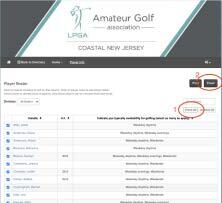
But you may also choose specific golfers to invite. The player list appears initially in alphabetical order. You can click on the column heading titled “Indicate your typical availability for golfing (select as many as apply)” to change the sort by this category which results in the following reordering of players:
1. Weekday daytime,
2. weekday daytime, weekday evenings,
3. Weekday daytime, Weekday evenings, Weekends,
4. Weekday daytime, Weekends ,
5. Weekday evenings,
6. Weekday evenings, Weekends
7. Weekends
In our example of a weekday daytime tee time, you could check all the members that are in categories 1, 2, 3, and 4 or individually select those you’d like to play with and/or those with similar handicaps. You determine how many and to whom you want to extend an invitation to play. Once you’ve selected the members to invite, click the dark grey email button at the top right (circled in read with the number 2 by it) which brings you to the email window.
The email
For the email Subject line, we suggest you list the date, tee time, and the golf course. Add your message which should include the number of slots you want to fill, your email, and cell phone number. Click send. The email sent will identify you as the source of the message by providing an email reply-to field in the header. As you get responses, let each respondent know if they have secured a spot to join you.
If you have questions about using this tool, contact Robbie Cohen at robbie.s.cohen@gmail.com.