

SCORING INSTRUCTIONS
A coach will be assigned to a group to keep their official (paper) scorecard and enter scores after each hole into the Golf Genius app for live scoring. See the instructions below for both procedures.
OFFICIAL PAPER SCORECARD
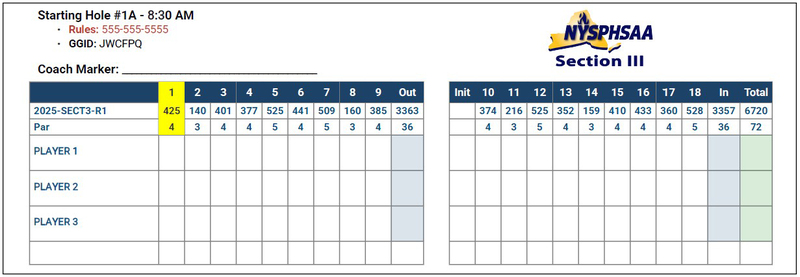
- A coach will be assigned to a group and given a paper scorecard
- The paper scorecard will have a line for each player to enter their score after hole, confirm verbally after each hole so all players hear the scores reported.
- When the round is completed, review each player's scores and each player must sign the scorecard to attest that it is correct.
- Return the scorecard to the lead coach on site.
LIVE SCORING INSTRUCTIONS
- Download the Golf Genius app to your phone
- Enter the GGID on the scorecard to login
- Select the player who is keeping score, if a coach is keeping score then select any player
- After each hole:
- Enter a score for each player, then
- Click save... you will be automatically taken to the next hole
- Scores can be edited by selecting the arrows at the top of the screen to move back or forward - click save if you make any edits
- Call the Rules phone number if you are having any issues with live scoring or need help with a Rules question